


Start Here: Your Thermocooler Roadmap
You want a thermocooler that works. You want to know how to build it. You want to know when it must be fixed or retired. This guide maps the path. It stays clear and direct. Gives you steps you can use now.
From planning to binning, you get a clean plan. Parts lists. Tests. Data and alerts. Routine care. Safe end‑of‑life. Sections are short. Steps are practical. You can read it fast. You can act on it.
Read on now. Start with the build. Track the life. Keep it safe. Know when to let go.


Building a Thermoelectric Peltier Cooler: Freezing Water and Hands-on Engineering
Build: Plan, Parts, and Assembly
You set the goal first. You pick the temperature and the load. You reduce surprises.
Set the goal
Decide the cooling load in watts. Think steady heat, not peaks. If a sensor reads 10 W, plan for 15 W. Add a safety margin of 20%. That spare headroom saves time and smoke.
Choose parts
Match modules to load and delta T. For small, local cooling, a Peltier (thermoelectric) fits. For larger jobs, use a compressor or vapor loop. Choose heatsinks rated for the heat you must dump. Pick fans with static pressure if you use dense fins.
Examples:
Thermal path and contact
Lay out a straight thermal path. From the cold face to the device, then to the hot sink, then to air. Short paths win. Use good contact. Use a thin smear of Arctic Silver or a phase-change pad. Torque screws evenly. Avoid gaps or tilted modules. Insulate the path where heat leaks matter. Use closed-cell foam or silicone sheets around edges.
Power and wiring
Size wires for current with 25% margin. Use a fuse or polyfuse near the supply. Keep grounds tight. Route power away from temp sensors. Use crimped terminals or soldered joints. Label both ends.
Assemble in stages
Dry-fit parts. Check alignment. Add paste. Tighten in cross-pattern. Power the controller with no load first. Add the module and test at 10% power. Watch temps and current. Increase in steps.
Keep notes
Write exact part numbers. Note torque and paste brand. Snap photos of wiring. These notes save hours when you rework or hand the build to someone else.
Now move to calibration and testing.
Test: Calibrate and Validate Performance
You must test before you trust. Build a simple test bench. Mount the thermocooler. Add the load. Give yourself clear goals. Measure, tune, and repeat.
Build a repeatable bench
Clamp the cold plate to a known mass. Use a cartridge heater or a resistive load to mimic real heat. Control ambient air. Run the system long enough to reach steady state. Short runs tell you nothing.
Measure what matters
Measure temperature, current, and voltage. Use good gear.
Log data at 1 Hz or faster for transients. Record ambient humidity. Condensation shows up when surface temp drops below dew point.
Steady state and transient checks
Let the system settle. Note the steady numbers. Then step the load. Watch how fast the cold side falls. Watch overshoot. Note oscillation. A slow system wastes power. A bouncy one risks damage.
Quick test list:
Tune your controller
Use PID. Start with low integral. Raise proportional until you see oscillation. Back off. Add integral to remove steady error. Add derivative to tame fast swings. Make small changes. Log each tweak.
Example: you aim for 5°C delta. If P is high, you will overshoot. If I lower I and raise D, the system steadies faster with less waste.
Watch for common faults
Hotspots on the hot sink. Loose screws. Thermal paste voids. Condensation on electronics. Fans that vibrate and make noise. Measure current draw against expected values. Fix wiring or mounting faults and retest.
Log every run. Compare to your target. Fix faults. Repeat until the data fits your spec. Next, you will move from lab runs to continuous tracking and alerts.
Track: Data Logging, Monitoring, and Alerts
You need numbers to know how it runs. Pick sensors and place them where they tell the truth. You will thank yourself later.
What to measure and where
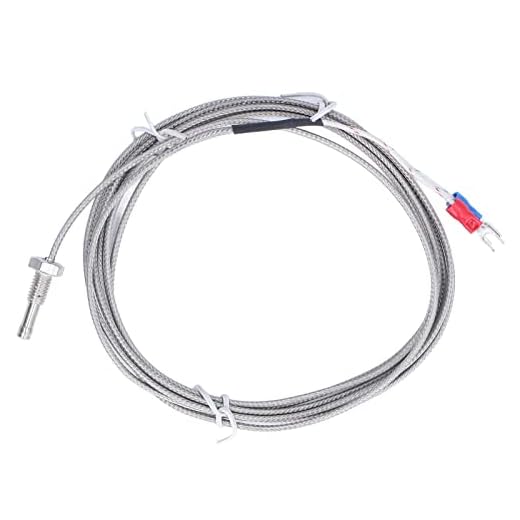
Measure cold-plate temp, hot-sink temp, ambient, and supply voltage/current. Put a sensor on the coldest point. Put one on the base of the hot sink. Measure supply with an INA219 or a bench meter. A Type J or K thermocouple on the plate and a DS18B20 for ambient works well.
Quick checklist:
Sampling and storage
Sample fast enough to catch change. For steady work, 1 Hz is fine. For control tuning, 5–10 Hz. For electrical spikes, you may need 100 Hz or more on the current channel. Log locally. Use SD card or onboard flash. Push aggregated metrics to a server to save space.
Formats and tips:
Dashboards and alerts
Push key metrics to a dashboard. MQTT to Mosquitto. Store in InfluxDB and view in Grafana. Or plug into Home Assistant for fast alerts. Keep dashboards simple. Show trends, deltas, and rate of change.
Set alerts for:
Use Pushover, Telegram, or email. Use rate-of-change alerts, not just fixed limits. A slow 0.2°C/day rise often tells you the paste is failing before a full outage.
Keep logs tidy
Name files with device and date. Tag columns. Keep a schema. Archive and gzip weekly. Document sensor locations in a readme. These steps make postmortem fast.
With solid tracking, you catch slow failures. You will know when to clean, repaste, or swap parts. Next, learn the routine checks that keep the system running.
Maintain: Routine Care and Troubleshooting
You keep the system alive with steady care. Small acts now save big fixes later. Use your logs to spot slow drift. Fix it early.
Daily and weekly checks
Look at temps and current. Scan your dashboard for slow rises. Listen for new noise. Watch for weird spikes in power. Tighten one loose wire. Replace one bad fan. Do not let small issues linger.
Cleaning and thermal care
Clean fins and fans with short bursts of compressed air. Brush dust from tight spots. Remove the fan for deep clean. Check fan bearings. If the blade wobbles, swap it.
Check mounting pressure and thermal paste. Uneven contact shows as hot spots in your logs. Repaste if you see a steady rise of 0.1–0.3°C/day or after two years of use. Use a quality paste and apply a thin, even layer.

Electrical and mechanical checks
Inspect wires for corrosion and chafing. Wiggle connectors while watching live readings. Swap to a spare cable if the reading flickers. Check mounts for play. A loose bracket moves the plate. A bent fin cuts airflow by tens of percent. Replace or straighten it.
Keep a good multimeter like the Fluke 117 for quick checks. Keep contact cleaner and dielectric grease for terminals. Use a torque screwdriver for critical fasteners. Follow mount specs. Tighten evenly.
Troubleshooting method
Isolate. Break the system into power, control, and cooling. Test one block at a time. Swap one part. Do not swap many things at once.
Start simple:
Log each step. Note time, change, and result. If a swap fixes it, you found the bad part. If not, revert and try the next.
Spares and record keeping
Carry these spares:
Record every repair. Date it. Note readings before and after. Over months, the record becomes your best tool.
Bin: Safe End‑of‑Life, Reuse, and Recycling
You must plan the end as you start. Leave time to decide when a unit is beyond repair. You must choose repair or retire. Make that call with data. Use your logs. Set clear criteria: thermal rise, repeated faults, or cost-to-replace above a threshold.
Salvage what still works
Pull usable parts first. Heatsinks, fans, controllers, and sensors often have life left. Clean and test each piece. Tag parts with a short note: date, origin, test result.

Make a quick checklist before you break the case:
Handle electronics and hazardous parts safely
Separate boards, power supplies, batteries, and fluids. Do not toss them with regular trash. Batteries and coolant can harm people and soil. Follow local rules for e‑waste and hazardous waste. Use labeled containers. Wear gloves. Unplug and discharge caps or batteries before handling.
Wipe data and preserve traceability
If your unit had a smart controller or networked logger, wipe it. Reset to factory state. Remove credentials and cloud keys. If you used onboard storage, overwrite or destroy the drive.
Log serials and disposal notes. Record:
This record helps audits and recalls. It helps you reuse parts with confidence.
Reuse, donate, recycle
Reuse what passes tests. Swap a working fan into a backup rack. Offer tested controllers to maker spaces. For the rest, find certified e‑waste recyclers or manufacturer take‑back programs. Ask for a certificate of recycling when possible.
A simple rule: keep what you can use safely. Recycle the rest properly. Your choices close the loop and cut waste. Move on to tie the whole process together in the final wrap up.
Wrap Up: Keep Track, Keep Cooling
You now have the map. Build with a plan. Test with care. Track with data. Maintain with discipline. Dispose with intent. Follow these steps and your thermocooler will serve you well. Keep your notes. Learn from them. Move on with confidence.
Start small. Log things daily. Fix issues fast. Replace parts before they fail. Reuse what you can. Recycle what you must. Share your findings. Teach others. Return to the plan. Stay steady. Stay curious.
Record failures. Note fixes. Improve your design. Backup logs off site. Review yearly. Celebrate small wins. Keep cool and carry on with calm purpose always.



Data logging + alerts = my favorite part. Set up the Elitech to push alerts and now I get a notification if temps drift — saved me once when the fan connector popped. Also, pro tip: name your Bluetooth devices something obvious; don’t end up with 5 ‘GSP-6’ devices in the list 😂
Great practical tip, Ethan. We actually added a short section on naming conventions and alert thresholds — sounds like that would have helped you.
Also log battery level if your logger supports it. Alerts for low battery are a lifesaver.
Yep, learned that the hard way at 2 AM. Now it beeps before I do 😴
Quick question about the Elitech GSP-6 Bluetooth Temp Humidity Data Logger: anyone know how long the battery lasts under continuous logging? The article mentioned it but didn’t give numbers. I’m planning continuous 1-min logs for a week — will that chew through it?
Also check the logger firmware — some versions drain more battery when using frequent BLE advertising. Turn off live streaming if you don’t need it and just download after.
I’ve run it at 1-min for ~2 weeks before battery hit ~30%. Might vary by ambient temp and Bluetooth usage. Bring spare CR2032s for long tests.
Good callout, Lily. The Elitech GSP-6 usually lasts 6–12 months on its CR2032 under normal logging intervals, but with continuous 1-min logs and Bluetooth on it can drop to a few weeks. We recommend an external power option or scheduled logging windows for long tests.
Adding this to the Test section: recommended logger settings for long-run tests (intervals, BLE off, power-saving tips). Thanks!
Solid article. I especially liked the Test: Calibrate and Validate Performance part — the checklist for PID tuning helped me get stable temps with the MTDELE module. Couple of extra tips:
– Use ARCTIC MX-4 sparingly and spread it thin.
– Secure the Type J probe near the cold plate, not the air stream, for accurate core temp reading.
Thanks for writing this!
Agreed on the probe placement. I messed that up first time and wondered why my icebox readout was always weird.
Awesome — glad the PID tips worked for you. Good note on probe placement and thermal paste amount. We’ll add a ‘how much paste’ visual guide.
I liked the Maintain and Bin sections a lot — too often guides stop at ‘it works’ and don’t cover end‑of‑life. A couple of constructive thoughts:
– Can we get a short flowchart for deciding reuse vs recycling? I.e., if compressor/TEC fails, check X,Y,Z then decide.
– The article mentions thermocouple probes (Type J). A note about calibration frequency and cheap probe drift would help. I had a probe off by 4°C and nearly ruined an experiment.
Also, small typo in the ‘Track’ subheader (extra space).
Lol I once ‘reused’ a dead cooler as a planter. Not the most efficient recycling but very aesthetic 🌱
We’ll include step-by-step calibration tips in the Test section, including ice bath and comparative checks. Appreciate the catch on the typo!
Flowchart would be amazing. For probe calibration I just use an ice bath + boiling point check and log offsets — simple and cheap.
Thanks Jason — those are great suggestions. We’ll add a reuse vs recycle flowchart and a calibration schedule (recommendation: calibrate Type J probes every 6 months under regular use). We’ll fix that pesky extra space too 😅
If anyone wants a quick test: compare your thermocouple to a calibrated lab thermometer at a few points. If it’s off >1–2°C, replace or recalibrate.
Question about safety: I’m planning to pair a TEC setup with an Ivation 24L casing for portability. The article mentions grounding and insulation but doesn’t detail fan compatibility — will the Thermalright Peerless Assassin 120 SE fit on a custom cold plate inside the Ivation without airflow issues? Also worried about power draw and using a common battery pack.
Any experiences? I’m careful but still a bit nervous about mixing OEM enclosure and DIY cooling.
If you want portability, consider using a smaller fan or a stack of low-profile fans instead of the Peerless Assassin. Less cooling capacity but way more battery-friendly.
Good concerns. Short answers:
– Mechanical fit: the Peerless Assassin is large; measure clearance inside the Ivation first. You may need to mount fans externally or use slim 25mm fans.
– Airflow: ensure intake/exhaust paths aren’t blocked by the Ivation’s interior walls—consider cutting vents and adding dust filters.
– Power: TECs draw significant current; typical battery packs for portable coolers aren’t rated for continuous TEC load. Use a dedicated DC supply or test run times carefully.
We’ll add a compatibility checklist for mixing components in the Build section.
Great roadmap — I followed the Build and Test sections and it really helped. I used the MTDELE TEC1-12706 kit for the cooling block and ARCTIC MX-4 for the thermal interface. A couple of notes from my side:
1) The TEC generates a surprising amount of heat on the hot side; make sure your heat sink (I used the Thermalright Peerless Assassin 120 SE) is mounted solidly.
2) For logging I paired an Elitech GSP-6 — Bluetooth setup was painless and the app alerts saved me when a solder joint went flaky 😅
Small gripe: the assembly photos could use closer shots of wiring and polarity for beginners. Otherwise, solid article!
Thanks for the detailed write-up, Sarah — super helpful. We’ll add a close-up wiring diagram to the Build section in the next update. Do you have any pics of your mounting setup you can share?
Nice build! Quick tip: add thermal adhesive to the hot side of the TEC if you’re not using screws — it reduces micro-movement and noise. Pics would be awesome 👍
Agree about the wiring pics. Also—did you try different fan profiles on the Peerless Assassin? I’m curious how noisy it gets under load.
Honestly, the ‘Bin’ section made me laugh — like we’re planning a dignified funeral for a cooler 😂
But seriously, good reminders about safe disposal and reuse. Might add a quick checklist for local recycling centers? Also wondering if the Ivation 24L is worth it vs. a DIY box + TEC setup.
Glad the tone landed 😄 We’ll look into adding a checklist for recycling hubs. Regarding Ivation vs DIY: Ivation is plug-and-play and great for portability, DIY with a TEC gives more control/efficiency but more complexity.
If you want reliability and convenience go Ivation. If you want to flex your maker muscles and learn about thermoelectrics, DIY all the way. Depends on patience level lol.